
Pokemon Bank is Closing!
As of February 25, 2027, Pokemon Bank servers are being shut down, and any Pokemon on those servers will be deleted. Any Pokemon on handheld cartridges will not be able to transfer to Pokemon Home, the Nintendo Switch and mobile app for Pokemon storage.
We will cover how to transfer Pokemon up to Home to preserve your creatures!
THE GOOD NEWS
The good news is you can still download PokeTransfer and Pokemon Bank! They must have been previously installed on the 3DS however. No new purchases can be made on the 3DS eShop.
> WARNING!
If you see the bright red warning message above, that means the following information can potentially lead to scamming you out of your Pokemon if you're using the help of others to retrieve your Pokemon. Read the information carefully!
Table of Contents
- Preparing for Transfer
- 3rd Gen Transfers
- 4th Gen Transfers
- 5th Gen Transfers
- 6th/7th Gen Transfers
- Bank to Home Transfers
Preparing for Transfer
First of all, we're going to make sure we have what we need to begin! The following list is the simplest form of everything you need.
- The games!
- 3rd Generation Transfers: 1 DS/ DS Lite, 1 3DS with Bank installed
- 4th Generation Transfers: 1 DS (any works), 1 3DS with Bank installed (or 2 3DSes, one with Bank installed)
- 5th Generation Transfers: 1 3DS with Bank installed
- 6th Generation Transfers: 1 3DS with Bank installed
Important note: If your 3DS has never had Pokemon Bank on it, you cannot get it! Your 3DS must have purchased Bank on the eShop prior to the eShop shutting down.
You can simply check on the eShop if you can download it by searching Pokemon Bank, and trying to purchase/ download it. If you have used Bank on that device before, it will download. Otherwise, it will tell you you cannot purchase it.
Here is a master sheet to explain how all games connect to each other and eventually to Bank:
(Right click and Open in New Window for a larger image)
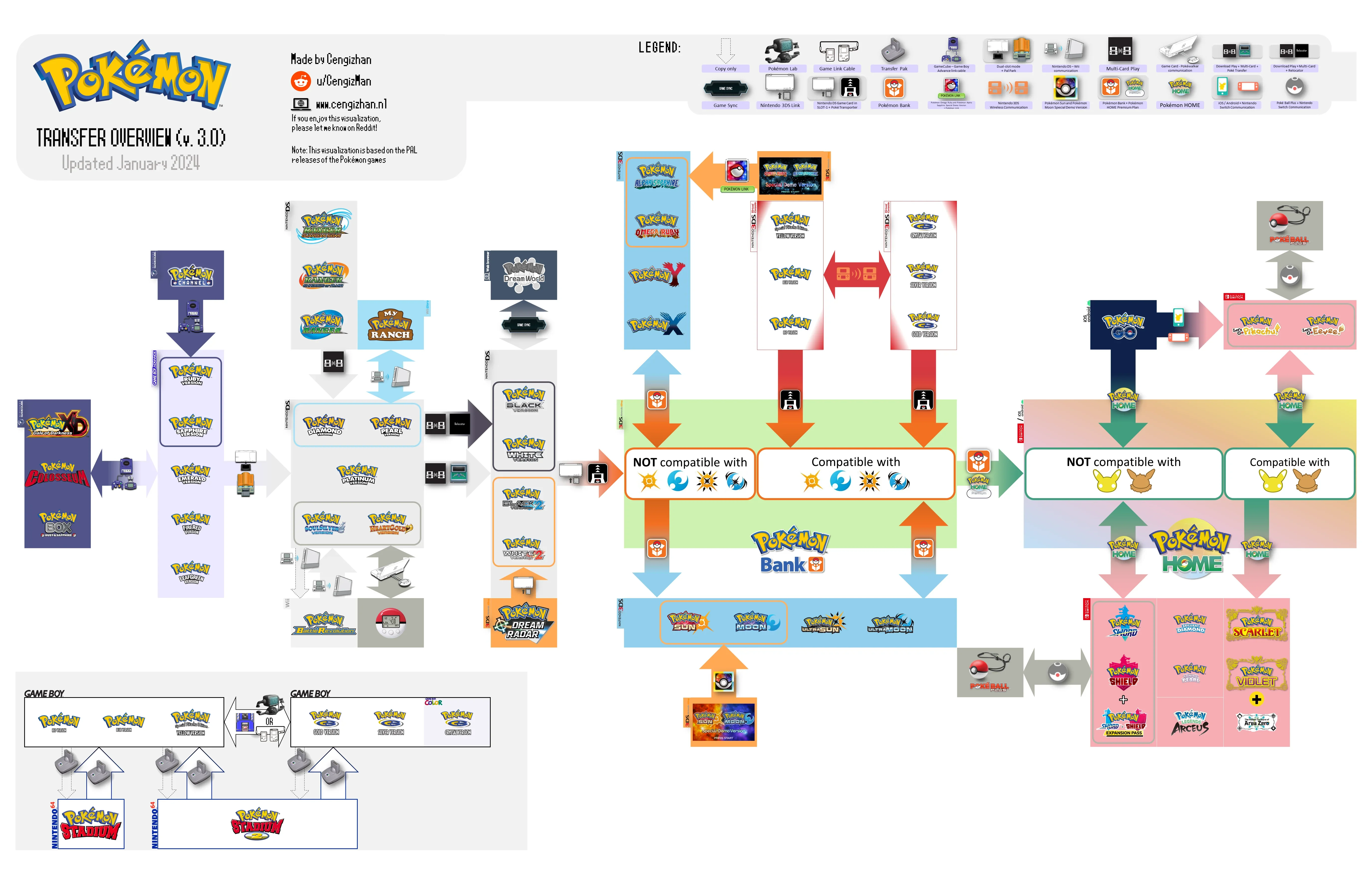
It's kind of a lot, so I'll be breaking it down in detail below.
IF you want to make sure you have all the exclusive Pokemon/ Ribbons from each game, below is a very comperhensive guide to everything you can get in every gamne:
A Link to a very thorough guide about game-exclusive Pokemon
If you're interested, this is a guide to DNS injecting. The Pokemon are legal, but the method is not officially Nintendo. This method gets you the Wi-Fi Event Pokemon on the DS games:
DNS Event How-To and List of Event Pokemon per Game
3rd Gen TRANSFERS
GBA games (Ruby/ Sapphire/ Emerald/ FireRed/ LeafGreen)
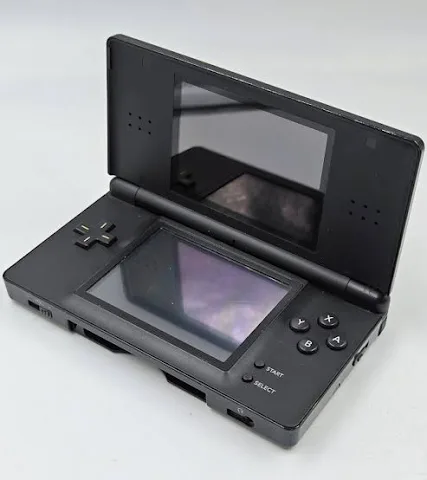
cannot be transferred to Bank, and must be transferred to a 4th Gen DS game using Pal Park on a DS. (DSi does NOT have a GBA slot, so those don't work!)
 "
"
The Pokemon will transfer from the GBA cartridge into the DS game cartridge, where the pokemon you transfer can be caught in the Pal Park. This also requires some progress to be made in the DS game to unlock the Park.
> WARNING!
If you have both of the games but no DS, you can get a friend with a DS to do the transfer for you/ lend you their DS. This process is very tedious as it's only 6 Pokemon at a time!
There isn't a way for the person with the DS to steal your Pokemon outside of literally running away with your cartridges, but it is important to mention nonetheless you'd have to be giving control of your cartridges to someone else. Always do these transfers at a public space, preferably a local game store!
If you have one game but not the other, such as owning FireRed transferring to someone else's Diamond, for example, your Pokemon WILL BE ON SOMEONE ELSE'S CARTRIDGE.
4th Gen TRANSFERS
4th Generation games (Diamond/ Pearl/ Platinum/ HeartGold/ SoulSilver)
must transfer to Generation 5 games with 2 DSes/ 3DSes.
> WARNING!
5th Gen TRANSFERS
5th Generation games (Black/ White/ Black 2/ White 2)
are easily transferred to 6th Generation games via Poke Transporter, downloadable via Pokemon Bank app if your 3DS doesn't have it installed.
Only Box 1 of your Gen 5 game can be transferred at a time, and then deposited into the Gen 6 game, rinse and repeat to transfer all of your Gen 5 Pokemon to Gen 6.
You're almost done!
> WARNING!
If you do not own the 3DS, your Pokemon WILL BE ON SOMEONE ELSE'S POKEMON BANK! Similarly, if you do not own the Gen 6 game, your Pokemon WILL BE ON SOMEONE ELSE'S CARTRIDGE!
6th & 7th Gen TRANSFERS
6th and 7th Generation games (X/ Y/ Sun/ Moon/ Ultra Sun/ Ultra Moon/ Omega Ruby/ Alpha Sapphire)
transfer directly to Bank through the Bank app.
With the 3DS game cartridge in the 3DS, open the Pokemon Bank app. In the app, you will be instructed to choose which Pokemon to move into the Pokemon Bank boxes. You can only move one box worth of Pokemon at a time.
> WARNING!
If you are using someone else's 3DS to transfer your Pokemon, your Pokemon WILL BE ON SOMEONE ELSE'S POKEMON BANK. Pokemon Bank does not use accounts to log in and out of, the Pokemon Bank account is attached to the DS it is installed on. Using someone else's handhelds to move your Pokemon to Bank WILL REQUIRE YOU TO STORE YOUR POKEMON ON THEIR BANK.
BANK to HOME TRANSFER
We've finally made it, the final stretch of the journey! Now that all of our Pokemon are in Pokemon Bank, it's time to transfer them to Home where they will remain safe (for now).
Booting up Bank, you'll select the Transfer to Home option and follow the instructions.
MUST TEST ABILITY TO TRANSFER TO DIFFERENT HOMES.